
Razer Wolverine V4 Pro wireless gaming controller review
I use my Razer Wolverine V3 Pro several times a week. It's become my go-to wireless controller (among many different options on my shelves), thanks to its shape, stickfeel, and build quality. It's plenty quick to react, it's got excellent triggers and face buttons, and is one of my favourite bits of gaming gear. Ever,...
I use my Razer Wolverine V3 Pro several times a week. It's become my go-to wireless controller (among many different options on my shelves), thanks to its shape, stickfeel, and build quality. It's plenty quick to react, it's got excellent triggers and face buttons, and is one of my favourite bits of gaming gear. Ever, in fact.
Then came the Wolverine V3 Pro 8K, and I wasn't too fussed. Sure, 8K polling is a nice thing to have, but it wasn't enough to sway me towards spending $200 on another controller. Now, however, I have a Wolverine V4 Pro review sample in my hands, and I have to admitâI'm sorely tempted to upgrade.
Razer hasn't messed with the core recipe that made the V3 Pro great. It's still got the same comfortable chassis shape, fantastic heavyweight, dual-action triggers, and all the right controls in all the right places. What it has done, though, is upgrade the hardware underneath, while adding a heavy sprinkle of customisation options that improve the experience considerably.
I thought I wouldn't get on with the slightly lighter stickfeel compared to the previous model, but I was wrong. It's still got a highly-controllable resistance, now combined with superb snap-motion accuracy from the new contactless sensors.
It feels sharper, without losing its smooth, slightly weighty movement. The battery life has been upped to a maximum of 27 hours. You can pull off the rear buttons and block the holes off with flush-fit magnetic plates. And you get 8K polling support, complete with wrist-shaking haptic rumble. Individually, these might seem like small changes. Together, they make one of the best controllers I've ever used⦠well, even better.
We do need to talk about the price. $200/£200 is an awful lot to ask for a gaming controller, especially when there are so many good options on the market for fractions of that sum. But the Wolverine V4 Pro has a kitchen sink-worthy list of features, all of which combine to create a brilliant gaming deviceâeven if your bank account may disagree.
Buy if...
â
You want the tippety-top of controller tech: You name it, the Razer Wolverine V4 Pro probably has it. Other than TMR or Hall effect sticks, which have been replaced with Razer's new (and rather excellent) capacitive sensor tech.
â
You want modular customisation that works: I've used enough modular gear to know it can sometimes feel a bit⦠half baked. Not so here, where everything clunks and clicks together seamlessly.
Don't buy if
â You're on a budget: There are plenty of excellent gaming controllers out there for much less money than the Wolverine V4 Pro.
â You won't use the extras: If the customisation features, 8K polling, and all the rest leave you cold, the Wolverine V4 Pro may be overkill.
Razer Wolverine V4 Pro features
Razer Wolverine V4 Pro specsLayout
Asymmetric
Compatibility
Windows 10/11, Xbox Series X/S
Connectivity
2.4 GHz w/included dongle, wired
Ports
USB Type-C
Thumbsticks
High-resolution capacitive sensors, swappable caps
Polling rate
Up to 8,000 Hz
Battery life
Up to 26 hours
Weight
305 g
Extras
Adjustable triggers, removable magnetic rear buttons, faceplate, and bumpers, mecha-tactile action buttons, magnetic blocking plates
Price
Take a deep breath, because there's a whole lot to go through here. At its core, the Razer Wolverine V4 Pro is an asymmetrical, Xbox-style controller with 2.4 GHz wireless and USB Type-C wired connectivity, alongside a maximum 8K polling rate over both wireless and wired connections. Razer says the Wolverine V4 Pro achieves sub-1 ms response times, thanks in part to the speedy polling.
Beyond the usual controls, there are also two extra configurable buttons between the bumpers and the triggers on the top side, alongside four extra "mouse click" paddle buttons on the underside. The triggers can also be locked with two toggle switches on the back, which means they can be switched between a full-throw action and a precise click on the fly.
On the front, you get a set of PBT face buttons with clicky, mecha-tactile switches underneath, which have a slightly shorter action than those found on the bog-standard V3 Pro. Diagonally opposite sits a very clicky D-pad.
Then there are the new thumbsticks. These feel slightly lighter and snappier than the V3 Pro's versions, although they still have a touch of weight to the action. Razer has imbued these sticks with what it calls "next-generation" capacitive sensors, which represent "the next step in contactless sensor design."
According to the company, these sensors offer superior resolution and are more resistant to magnetic interference when compared to the TMR and Hall effect models found in other high-spec controllers, while still avoiding stick drift. When paired with the 16-bit ADC chip inside, the new tracking results in around 3,000 steps of movement tracking per sensor.
Still with me? Good, because I haven't got to the customisation options yet. The front faceplate of the V4 Pro is now magnetic, and can be removed by wedging your fingernails underneath a hidden groove on the topside and giving it a sharp pull. Razer says more faceplate options are coming soonâso prepare yourself for the inevitable Minecraft tie-in, I guess.
You also get six interchangeable thumbstick caps to choose from. By default, it comes with your standard short concave models installed, but there are also a pair of taller versions, and a pair of convex replacements for weirdos. I mean, those who prefer a totally different thumbstick experience.
The rear paddle buttons are also removable, and the holes can be filled in with magnetic-locking plates that fit flush with the frame. All of these magnetic additions explain the switch to interference-resistant capacitive thumbstick sensors, that's for sure. You can also switch between software profiles on the fly with an assigned button combo. Phew.
What's left? Oh yes, the battery life. Razer reckons you'll get a maximum of 27 hours out of the V4 Pro, a seven-hour improvement over the old model. That depends on polling rate and haptic settings, though. Charging from empty to full is quoted at three hours via the USB Type-C connection.
The last change is a pronounced lip around the USB Type-C port on the rear. This is to prevent a flexed cable from damaging the port over time, although my old V3 Pro sits on charge regularly and has never had an issue. The raised section is a bit⦠over-pronounced, if you ask me. The lip stands out on what is otherwise a seamless design. Still, I appreciate the concession towards durability, if nothing else.
Razer Wolverine V4 Pro ergonomics
I've been holding the V4 Pro up against my V3 model for some time now, and it looks (and feels) like exactly the same chassis shape to me. This is a very good thing. If I look ever so closely, I would say the textured grip on the rear of the V4 Pro is slightly finer, although this could be down to wear on my older version.
It's the differing textures underneath the various controls that stand out, though. The triggers still have a weighty resistance to them, with a deliciously smooth action. The main bumpers click with precision, whereas the taller macro buttons underneath them have a longer, "snippier" sort of click. You won't mix them up easily while staring at a screen, I've found.
The matte-finish PBT used on face buttons is plenty grippy under the fingertips, and while the switches underneath feel roughly the same, there does seem to be a slightly faster action when placing them side-by-side with my V3 Pro. Again, that could be down to wear on my used model, but there's definitely an improvement under my right thumb here that I appreciate.
And as for the snappier thumbsticks, I didn't think they were much of an improvement when I tried them out in a Gamescom booth earlier this year. However, having now spent some quality time with them, the lighter stick resistance really does make a difference to my aiming speed. There's still a little bit of aim-steadying pushback, alongside a quicker snap back to center.
Speaking of the sticks, I can't help but be impressed by the robustness of the V4 Pro's customisation system. The thumbsticks themselves can be pulled off with a reasonable amount of force, and pressed back on firmly without incident. The faceplate is similarly secure, but it's still easy enough to remove once you know where to put your fingernail.
You don't have to remove the faceplate to replace the sticks, but I thought I'd try both together to see if I could disassemble the front of the controller with one hand:
And yes, I can. But the biggest boon to customisation happens round the back, where any (or all) of the rear paddle buttons can be removed and replaced with magnetic-locking plates. These snap into place to create a remarkably flush fit, which makes the plates practically disappear underneath my fingers.
I've got used to resting my ring and pinky digits on the rear paddles of my V3, but if you're not using them all the time, they can feel a little obstructive.
No such worries here. Block them all off individually, or keep one or two around for specific tasks if you so wish.
Despite all these modular features, the V4 Pro feels like a rock solid, totally finished product. There are no rattles, no rough edges, no fiddly bits of cheap plastic. It might be expensive, but this controller really does feel like you've bought a ticket to the executive lounge.
Razer Wolverine V4 Pro performance
To test the Wolverine V4 Pro, I booted up three controller-favouring games from my Steam library: Elden Ring, Crimson Desert, and Control Resonant. I have many hours in each, much of which has been spent with either the V3 Pro, or the standard Xbox Wireless controller. I also had a knock around in Apex Legends to test its shooter capabilities.
And to my genuine surprise, I could feel the difference immediately. Control Resonant in particular, a game with much target switching and button juggling, actually feels a touch easier with the new Wolverine. The snappier thumbsticks make a real difference to fast direction changes, and while I'm no expert judge of 8K polling and sub-1ms latency times, the V4 Pro definitely feels quicker to respond.
The haptic responses are also super-powerful. So much so, I think most people will probably turn them downâbut vibration fans are in for a buzz. Turning this controller on for the first time actually made me jump, as it jiggled my desk with such force.
The face buttons are quick to press and slightly more positive, too, which adds to the feeling of snappy responsiveness. And I really enjoy the heavyweight triggers, which make firing an arrow in Crimson Desert feel more purposeful than most. My Elden Ring performance has also felt the benefit, although I still suck at it overall. No fancy controller is going to change that.
And while I'd personally never pick a controller over keyboard and mouse controls in a shooter, the Wolverine V4 Pro is plenty responsive in Apex Legends, too. If I had to use my thumbs for precision shooting? I'll take one of these, please. It's better than any other controller I've tried for speedy first-person aiming, put it that way.
There's a feeling of extra precision to the Wolverine V4 Pro that I didn't realise the previous version lacked. It's subtle, but very much there. One feels like a luxury item with a touch of padding, while the other is sharper, lighter under the fingertips, and slightly more eager.
Plus, being able to individually remove the rear paddles (I quite like dropping them down to two, ring fingers only) makes for a more comfortable gaming experience.
I'd expected to forget about the internal upgrades once my brain was focussed on a game, but I was wrong. It's easy to tell that improvements have been made. And switching back to a standard Xbox Wireless controller afterwards definitely feels like a major downgrade. Still, you can pick one up for around a quarter of the priceâso I can't knock it too badly.
Razer Wolverine V4 Pro aesthetics
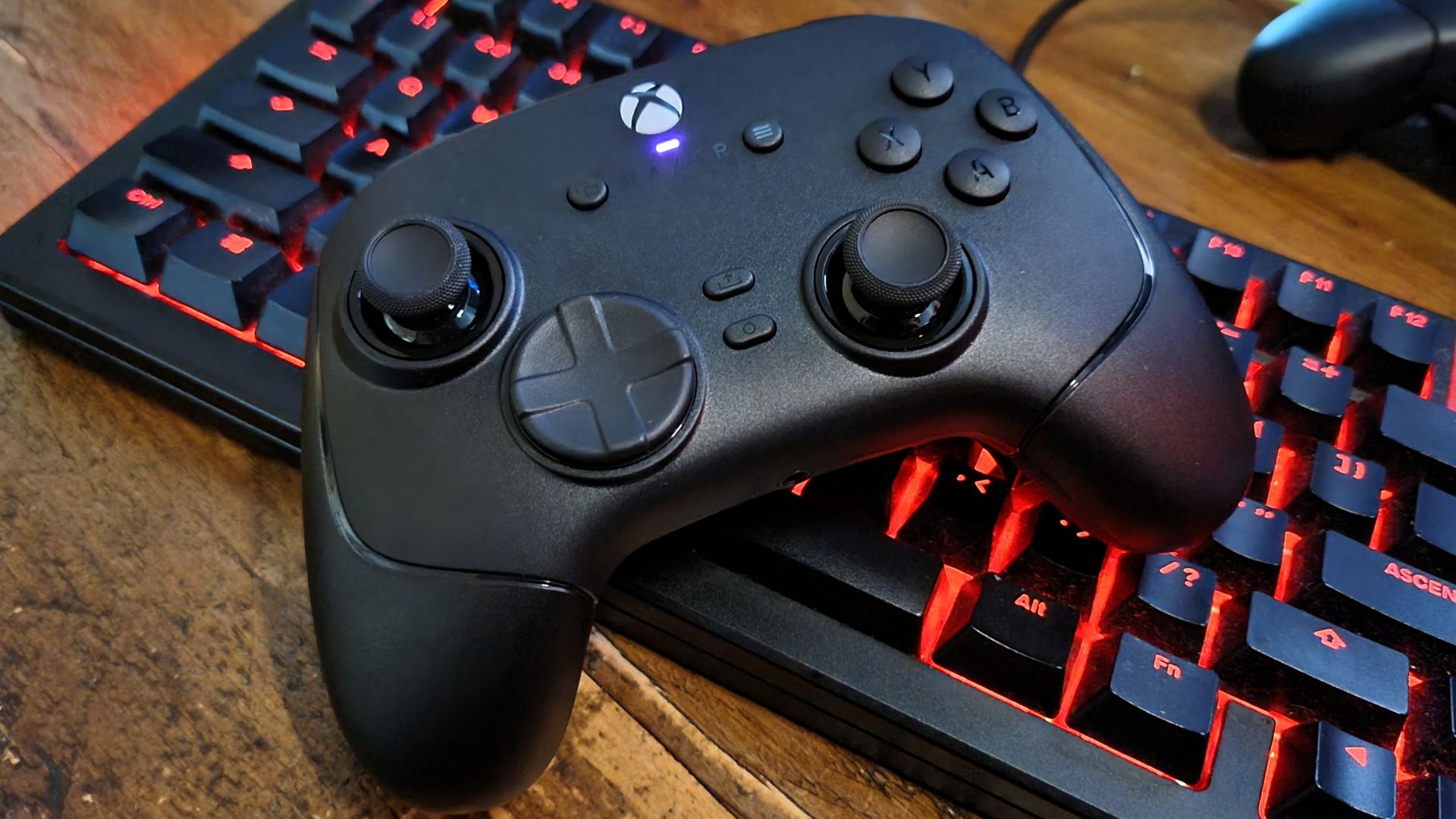
Razer has ditched the RGB-lit lettering on the front of the new Wolverine, but I doubt many will miss it. I've turned mine off on the older model, as while it looks good in photos, it can be a touch distracting. Instead, what you get here is a stealthed out, grown-up-looking device.
Not very Razer, is it? Still, I'm definitely a fan of the all-black aesthetic. The matte finish on the PBT face buttons doesn't just feel good, but looks the part, too. I suppose it's not the best controller for beginners, or those who still hunt for the Y button in a panic during a QTE event. There are no multi-coloured buttons or white letters to help you out here.
My major bugbear, though, is the protruding USB Type-C cable port, which sticks out more than I'd like and makes for an ugly blemish on what is otherwise a very refined design. At least it's round the back, ey?
Razer Wolverine V4 Pro software
The Wolverine V4 Pro is configured via Razer Synapse, which will be a benefit for those of you with Razer devices alreadyâand perhaps a downside for those who don't. Still, Synapse is very workable these days, and the menu system for this particular controller is pretty straightforward.
Alongside the profile switching options at the top (which can also be cycled using on-controller button combos) there are five main tabs: Customize, Triggers, Thumbsticks, Power, and Calibration. The first gives you the most useful settings, these being polling rate, haptic intensity, and communication switching modes, alongside button configurations.
There are also options for the SOCD feature, which allow you to configure what happens when you press and hold two opposite directions at once.
You can adjust the trigger ranges in the second tab, and fiddle with the sensitivity and dead zones of the thumbsticks in the third. Honestly, I feel like a lot of these options could be boiled down to a single page, but at least it's not a labyrinth of poorly worded menus like some others I could name.
A case in point is the fourth tab, Power, which has exactly one thing you can adjustâthe length of time the controller stays on when inactive. And the fifth tab handles individual control calibration, which I guess is worthy of its own section. Overall, though, the software is perfectly acceptable. Better than most, even.
Razer Wolverine V4 Pro
Razer quotes a 27-hour battery life for the new Wolverine, although I'd imagine that's at lower-than-8K polling rates. What I can say from my own testing, though, is that my review sample came out of the box with a 65% charge and I've only just plugged it in. That's after several days of on/off gaming.
Those weren't 24-hour sessions, of course. But several eight-hour sprints without reaching for the USB cable certainly seem possible. I'm still old-school enough to want to plug my controller in after I've finished, but it's a habit I'm starting to break.
What would be nice though, for the cash, would be an included charging stand. It's something we're starting to see more often these daysâeven with some of the more affordable controllers, like the EasySMX D05. Food for thought, Razer?
Razer Wolverine V4 Pro value
Do we have to talk money? I'm afraid so. The Wolverine V4 Pro is expensive, and there's no getting around it. When the GameSir G7 Pro Tri-Mode costs $80, the $200 price tag of Razer's new baby looks more than a little excessive.
The G7 Pro also has customisation options similar to the Razer, with its removable faceplate and swappable controls. You can't get rid of the rear paddle buttons, though, a feature I find most handy on the new Wolverine. The GameSir model also has TMR thumbsticks, which should be in the same ballpark as the Razer's. They won't stick drift, put it that way.
In terms of value, it's clear that the GameSir G7 Pro Tri-Mode wins the day. It's less than half the price, for goodness sake, and it comes with a charging cradle. But I don't think the heavyweight price tag spoils the Wolverine V4 Pro, either.
Yes, it's a lot of money to pay for a controller. But if you're the sort of gamer who sits for hours every weekend with one in your hands, the Razer really does feel like the final boss. It's got pretty much every feature you really need (and many extra niceties you might not expect), alongside a smorgasbord of delicious controls and switches that feel like the cat's pyjamas. And when it comes to speedy inputs? Fuggedaboutit.
Plus, being able to individually block off those rear paddle buttons and swap out thumbsticks on the fly makes more difference than you think. Whatever your setup, whatever your odd combination of control preferences, the Razer is likely ready for you. And it's even managed to avoid any overblown gamer flair while it's at it. This is a grown-up device for adults, not an RGB-covered piece of frippery.
Pricey? You bet, and I wish it was significantly cheaper. But, in the same way I'd happily recommend spending a lot of money on something brilliant you're going to use all the time, like a great gaming chair, TV, or headset, I do think the Wolverine V4 Pro makes a very good case for justifying the expense.
Original reporting appears on the publisher’s site.
Open original article →