GameSir Nova Lite 2 review
The GameSir Nova Lite 2 is our new best budget controller for PC. It's extremely well equipped considering the small asking price. Depart with just $30/£30 of your hard-earned cash, and you'll receive a wireless controller with Hall effect sticks, mechanical D-pad, trigger stops, and programmable rear buttons.There's e...
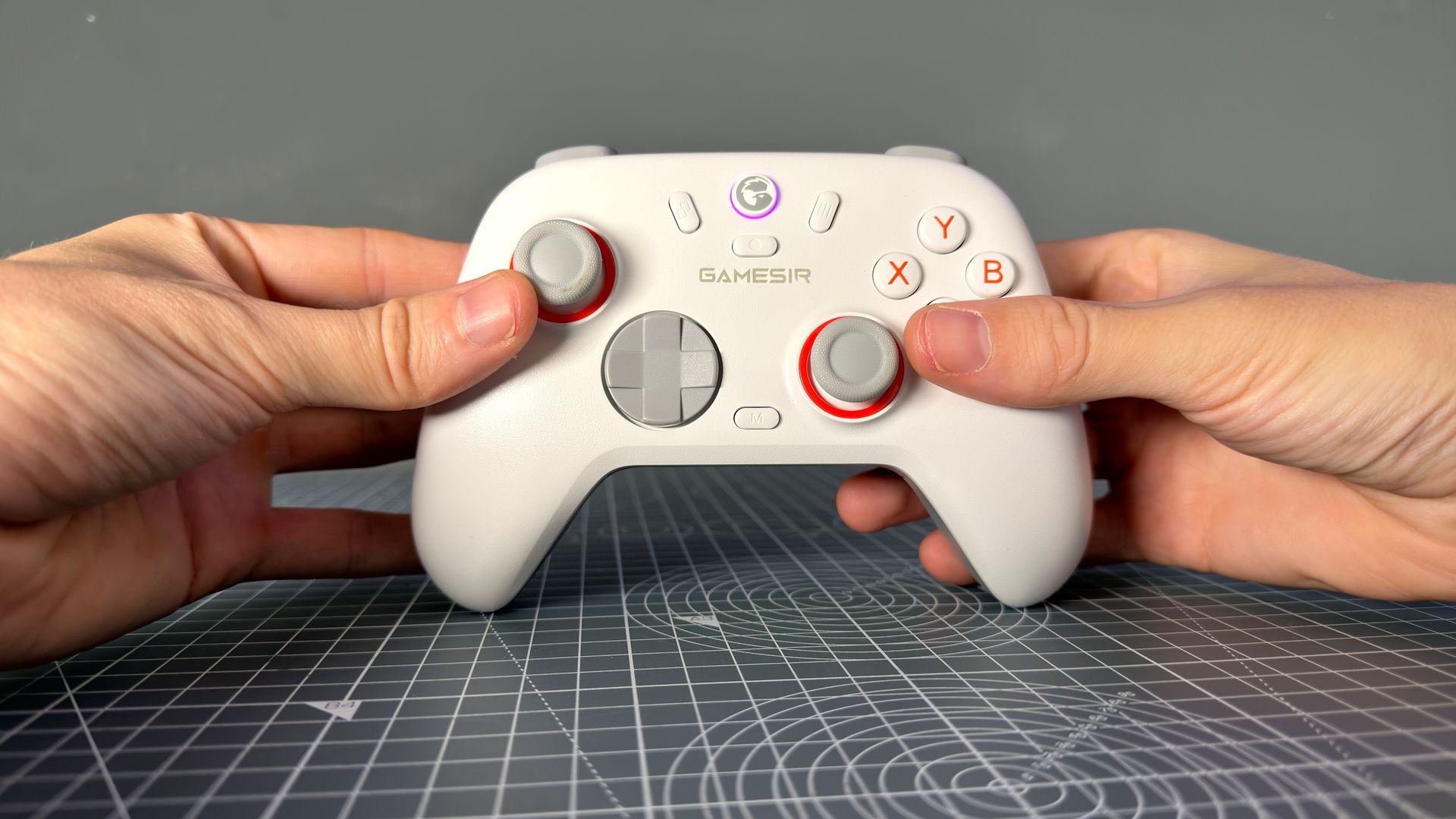
The GameSir Nova Lite 2 is our new best budget controller for PC. It's extremely well equipped considering the small asking price. Depart with just $30/£30 of your hard-earned cash, and you'll receive a wireless controller with Hall effect sticks, mechanical D-pad, trigger stops, and programmable rear buttons.
There's enough here that even GameSir's own exceedingly popular G7 Pro is at risk of cannibalisation. The Nova Lite 2 doesn't look that out of shape by comparison, with only quality of life and more advanced features between them. Such as a handful of micro switches and a bigger battery. The G7 Pro is a better all-round controller, but for less than half the cash, the Nova Lite 2 is tough to ignore.
There are some drawbacks with a controller at this price. The plastic doesn't feel great and it's not overly grippy. The software could be smarter and the shoulder buttons wider, too. But they all seem savvy sacrifices for the savings that the Nova Lite 2 delivers.
Buy if...
â You don't use a controller often and you're not looking to spend a lot of money: If you use a mouse and keyboard for most of your gaming, you don't need the next best thing. A dependable, wireless pad like the Nova Lite 2 is plenty sufficient for the odd singleplayer game.
Do not buy if...
â You want lots of customisation: You can't change the thumbsticks out on the Nova Lite 2, nor are the trigger stops switching between different types of actuation as with more high-end pads. There's no lighting, only a couple of extra buttons, and the software could be better. But, hey, not everyone is into that sorta thing.
GameSir Nova Lite 2 - Features
Nova Lite 2
G7 Pro
Wireless
Yes
Yes
Connectivity
2.4 GHz, Bluetooth, wired
2.4 GHz, Bluetooth, wired
Polling rate (Hz)
1000
1000
Triggers
Two-stage Hall effect
Dual-mode Hall effect + micro switch
Thumbsticks
Offset Hall effect
Offset Mag-Res TMR sticks
D-pad
Mechanical
Mechanical micro switch
Additional buttons
2
6 (4x back, 2x mini bumpers)
Face buttons
Membrane
Optical micro switch
Battery
600 mAh
1200 mAh
Gyro
No
Yes
Rumble
Yes, twin-motor
Yes, quad-motor (grip + triggers)
Price
The Nova Lite 2 is less than half the price of the G7 Pro, but it's not at a loss for many of the same or similar features. This budget gamepad really packs a lot in.
First off, it offers wireless connectivity at a low cost. It supports 2.4 GHz for PC, via a USB Type-A dongle, and Bluetooth for Android, iOS and Switch. Using the 2.4 GHz dongle, I measured a range exceeding 20 metres, in line of sight, so I wouldn't worry about range at any sensible distances (though Bluetooth and a wall or two will notably trim that down).
Then there are the Hall effect sticks. These sorts of sticks are becoming pretty ubiquitous among gamepads these daysâthat or TMR, as found in the G7 Pro 8Kâbut they lower the chance of pesky stick drift making an appearance later in life. This pair lack the premium feel of more expensive controllers but they're otherwise pretty great.
The triggers are also Hall effect, though most are, and offer two modes: full range of movement or stubby li'l clicks. You might get some use out of the shortened trigger stops in fighting gamesâa more tactile controller may be better suitedâthough they do come in handy when using the Nova Lite 2 with a Switch 2. I've been using the Lite 2 on Switch and it's very well suited for a mean Mario Kart machine like myself.
The mechanical D-pad is a standout feature. It has a great, lightweight click in each direction. It doesn't take much to actuate but you can be quite deliberate with it. For more casual users, it's great for clicking through menu screens, though it could just as reliably be mashed repeatedly in a fighting game.
The face buttons are standard fare. They're just membrane and aren't anything special. The two rear buttons are also not particularly tactile, being hewn from the same plastic as the housing on the controller. That, too, is just okay. I don't expect much more from a controller at this price tag, but it doesn't feel like it's going to break apart between your hands, either. There's no major flex to any of the plastic housing and only a little creakiness when pressed firmly.
Now, for one thing I don't actually like about this controller, and that's the plastic travel case that comes with it. I get the idea, and hey, if you travel with your controller often, it saves the thumbsticks, but for many people, myself included, it feels a bit like plastic waste I could've done without.
GameSir Nova Lite 2 - Value
The Nova Lite 2 is superb value for money at $30/£30. It lacks some more advanced features, such as a gyro, but makes more than up for it with practical, real-world benefits, such as a mechanical D-pad and Hall effect thumbsticks.
It's a step up over the existing Nova Lite. That's on its way out as our pick as the best budget controller, to be replaced by the Nova Lite 2. That controller is still an option for a slightly reduced fee of $23/£18, but the Nova Lite 2's rear buttons, trigger stops, and mechanical D-pad wholly justify the slight increase in cost for me.
Considering the cost of some wired controllers these days, the wireless Nova Lite 2 feels like a bit of a steal.
GameSir Nova Lite 2 - Ergonomics
The Nova Lite 2 is very, very normal. It's slightly less sculpted than a modern Xbox pad, but has a similar shape. The rear plastic is ever so slightly textured, adding the tiniest amount more grip. Most buttons are easy to reach without moving my hands much, including the extra rear buttons. The only real oddity is how small the bumpers are: they don't extend around the corners of the controller like most pads these days.
It comes in black or white. Both have orange highlights around the thumbsticks, orange switches on the rear triggers, and orange legends on the face buttons. Big Stadia Controller vibesâremember Stadia?
I'm really scraping the bottom of the barrel for things to describe here. This thing is plain, but not offensively so.
GameSir Nova Lite 2 - Software
GameSir Connect is the best way to control the Nova Lite 2 on PC. It's a bit basic as far as modern software goes, though the core functionality one might expect is all in there.
You can control the deadzone for each of the thumbsticks and triggers, vibration intensity, rear button assignments, and lighting within the app. There's just one bonus feature: hair trigger mode. This is loosely equivalent to rapid trigger on some modern gaming keyboards, in that the trigger will click and release based on the relative movement of the trigger, not its absolute position. As GameSir says in the app, it's "useful for scenarios that need fast triggering."
The GameSir Connect app also offers software updates for the controller. Best use it at least once.
There's also a mobile application, simply called GameSir, but it has just two out of five stars on the App Store and a weaker UI than the desktop app. I'd not bother unless you're strictly mobile/Switch only.
Finally, there are ways to configure the controller without any software whatsoever. I appreciate this option for the software-averse among usâeven if the actual combos are tough to remember.
So, selecting between PC (X + GameSir) and Bluetooth (B + GameSir) is easy enough, but remapping the back buttons (M + L4/L5, followed by the key to remap), turning on Turbo mode (M + any button), and turning on hair trigger mode (M + LT/RT) might require the manual for a reminder.
GameSir Nova Lite 2 - Gallery
GameSir Nova Lite 2 - Battery life
GameSir doesn't note a specific battery life for the Nova Lite 2. It simply offers a battery capacity, which sits at 600 mAh. That's the same as the Nova Lite, which had a stated 10-hour battery life, so we can more or less assume a similar expected result for the Nova Lite 2.
I've measured how long it takes for the controller to go from 100% to 0% over the course of a couple of gaming sessions. It took roughly eight and a half hours. I suspect with the lighting disabled and a different style of play, it'd be possible to crack the expected 10-hour mark, but either way, it lasts long enough to not cause an issue.
Original reporting appears on the publisher’s site.
Open original article →