Xgimi Titan Noir Max review
Once in a while, something comes along that recalibrates your expectations and also sort of ruins your enjoyment of what was once impressive. The Xgimi Titan Noir Max does just that. It makes mainstream projectors look positively pedestrian.That's not to say it's perfect. There are a few niggles that take the triple-la...
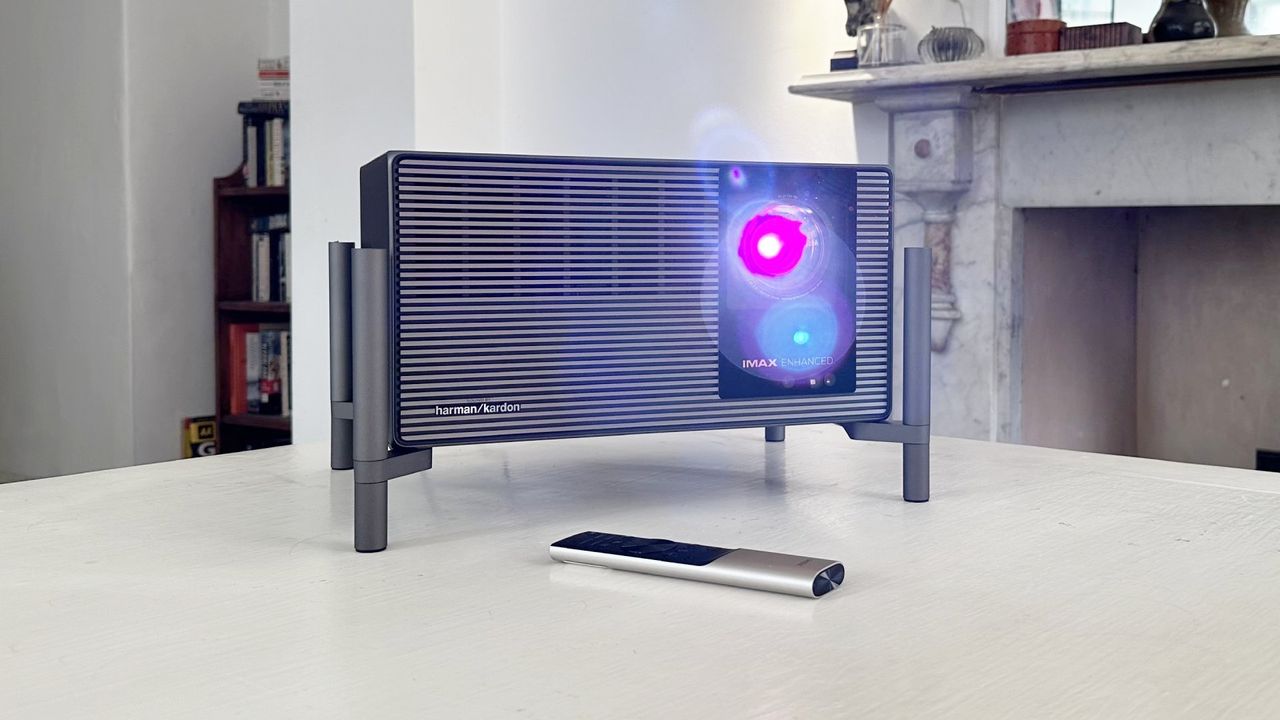
Once in a while, something comes along that recalibrates your expectations and also sort of ruins your enjoyment of what was once impressive. The Xgimi Titan Noir Max does just that. It makes mainstream projectors look positively pedestrian.
That's not to say it's perfect. There are a few niggles that take the triple-laser shine off this $5,000 beast, especially for gaming. But Xgimi's new big-screen beamer is an absolute stunner and deeply, deeply desirable.
The basics begin with triple-laser RGB technology that's good for an eye-popping 7,000 lumens. That's combined, inevitably, with DLP and pixel-shift tech to deliver full 4K resolution at 60 Hz, plus 1080p at up to 240 Hz. Running at the latter setting, Xgimi claims that the Titan Noir Max is good for just 1 ms of latency.
Titan Noir Max specsProjector type
DLP pixel shift
Resolution
3,840 x 2,160
Brightness
7,000 lumens (5,000 lumens sustained)
Latency
1 ms @ 1080p
Refresh rate
60 Hz @ 4K, 240 Hz @ 1080p
Optics
0.98-2.0:1 throw ratio, ±130% vertical and ±50% horizontal lens shift
Contrast
10,000:1 native
Features
RGB triple-laser, auto-focus, Dolby Vision, anti-rainbow effect, 3x HDMI, optical and 3.4mm audio
Price
Buy if...
✅ You have money to burn: If money is no object, this incredible beamer won't disappoint. It's incredibly bright and oh-so precise.
Do not buy if...
❌ Gaming is your priority: Xgimi's own Horizon 20 projector has most of the important gaming features for a fraction of the price.
That makes it a pretty plausible proposition for online gaming and esports, at least in terms of response. The ergonomics of playing Counter-Strike on a projector might be pretty questionable, but in performance terms, well, the Titan Noir Max delivers the numbers.
If that's the broad brush of what the Xgimi Titan Noir Max offers, the details are arguably even tastier. Xgimi is using a new generation of DLP chip that enables improved native contrast. That's combined with a 50-laser light source and Dual Intelligent Iris technology to deliver 10,000:1 native contrast. Factor in other digital contrast enhancements and you're looking at 100,000:1 claimed dynamic contrast.
Then there are the optics. This thing has some very trick lens hardware. It's built around a 15-element lens system that's said to deliver consistent edge-to-edge focus. You also get very broad optical lens shift of 130% +/- vertical and 50% +/- horizontal. That gives this projector immense installation flexibility without the need to resort to digital keystone correction.
And you absolutely, positively don't want to use digital keystone correction on any projector. It does horrible things to pixel precision and in turn image sharpness. It's also worth noting that this is, essentially, a traditonal long-throw projector rather than one of those nifty short throw things that can sit right below your projection screen.
That said, it has 2x optical zoom and a throw ratio of between 0.98:1 and 2.0:1, so it's actually pretty configurable. It can create both a pretty large image at short distance and shrink the image from distance to fit your projection screen.
All of that is built into a beautifully lush looking alloy cube chassis that's presented in a nifty carry case and goes some way to justifying the hefty $5,999 MSRP. The real-world pricing of this projector is a bit more complicated than that on account of it being the subject of a Kickstarter campaign. But hold that thought, we'll come back to the value proposition later.
Connectivity includes three HDMI ports, LAN, both optical and 3.5mm audio, and Wi-Fi. Note that the latter doesn't indicate that this projector has built-in smart TV functionality. It does not. It's a pure projector and that's fine by us. Devices like Firesticks, after all, are so very affordable, if that's your use case.
Still, you do get a very slick remote control with, again, a lush metal chassis that lights up when you pick it up and allows access to the Xgimi's various menus and settings. And, boy, are there a lot of settings.
That's immediately obvious as soon as you fire the Titan Noir Max up. After choosing your language upon initial boot, the system goes through an automated setup and focus routine, powered by its triple-sensor TOF, which among other things detects the range to your projection surface and automatically focuses the image and optimises framing and geometry.
You don't have to be precise in terms of physically positioning this projector to achieve an image that lines up with your projection surface perfectly.
In testing, I found the auto-focus worked really well, but the rest of the automated setup is more problematic. For starters, the automated digital keystone is on by default. Especially in a computing context, that's a bad idea. The Titan also failed to frame the image correctly on my projection screen, albeit it's not absolutely clear to what extent the automated features are supposed to be capable of that.
Whatever, that's not really a negative given how excellent the manual lens shift functionality works. Lens shift, for the uninitiated, allows the image position to be adjusted without compromising geometry. In other words, it means you don't have to be as precise in terms of physically positioning this projector to achieve an image that lines up with your projection surface perfectly.
Not only does the Titan have a really wide range of adjustment, it also provides a grid pattern that makes it super easy to perfectly align the image. Slightly less user friendly is the rest of the settings menu. Part of the problem is that there are just so many options, whether that's features like so-called AI-enhanced contrast, iris aperture settings, colour spaces, and much, much more.
It's definitely a little bit more difficult than it should be to ensure whether features like digital keystone are enabled or not. To me it's also a bit of a worry that there are no controls on the chassis save for a power button. Lose that remote control and you really are in trouble. Though I suppose you could say the same of most TVs.
Anywho, this is a complex device and I've barely touched on a whole range of further features and functionality. There's the Harmon-Kardon audio, which produces pretty decent sound in a pinch when you don't have access to some speakers, for instance. Or the broad HDR support including Dolby Vision, the MediaTek image enhancing chip or even Xgimi's own X-Vision chip that powers the AI contrast capability, known as Dynamic Black Level Enhancement.
But let's get to what really matters, namely how good this projector actually looks. Xgimi has clearly configured Titan Noir Max projector to pop from the get go because the dynamic iris functionality is enabled by default and hence maximum brightness is essentially toggled when hooked up to a PC. And it is really, really eye poppingly bright.
In practice, the sustained brightness capability is actually 5,000 lumens. The 7,000 figure is something that can only be sustained for short periods. But, seriously people, 5,000 lumens is still awfully, awfully bright. Happily, the Titan Noir Max has such fantastic native contrast, that doesn't translate into washed out black tones.
The caveat here is that this thing is so bright, light reflecting back onto the screen from the general surroundings is an issue. If you have a dedicated black-out cinema room with low reflectivity walls, that's not a problem. But in a regular room with white walls, it's an issue.
The caveat here is that this thing is so bright, light reflecting back onto the screen from the general surroundings is an issue.
Still, this is one heck of a bright projector and that means it works better in the daytime than dimmer alternatives, though I personally don't think any projector looks great when there's lots of ambient light around. At night, well, you can adjust the brightness to suit.
I won't get too bogged down into the movie watching experience. It's frankly stellar once you've got everything setup correctly, albeit I wasn't quite able to achieve a colour balance I was completely happy with, no matter what colour space or colour mode I chose.
And you do need to dig down into the settings to get a good result because there's far too much image processing on by default in the non-gaming modes. The MEMC (Motion Estimation, Motion Compensation) motion smoothing feature is on by default in most modes, and it looks like absolute crap.
For gaming, all that nonsense is mercifully disabled to achieve the lowest possible latency and, indeed, the very last word in colour calibration is likewise less critical. That said, most of the colour options while running in Game Mode are atrocious, even for gaming. After a bit of a panic, I eventually discovered that, for whatever reason, the only colour space in Game Mode that gives decent results is Rec.709.
That's a relief because you absolutely want to use Game Mode to game. There's noticeable latency in all the other modes, even the pared-back Filmaker Mode that supposedly disables all the image processing to "faithfully convey the film director's creative intent."
That initial caveat aside, gaming at 4K on the Xgimi Titan Noir Max is to die for. So many projectors look a bit weedy and washed out when playing games. Not this beast. It's so bright, the desert sun in Cyberpunk 2077 is actually kind of painful when you point your mouse at it.
The detail and precision thanks to the true 4K resolution is fantastic, too. Just to put this into context, a lot of digital cinema projectors are still 2K, so you're getting a far sharper image with this projector than you often do at the cinema. Of course, 4K support is pretty commonplace these days, so that's not unique to the projector by any means. But the high-quality optics make for an exceptionally sharp image thanks to the precision and consistency of the focus across the screen. It's pretty special.
At this point, so far so good. This is the best gaming experience I've had on a projector. But here come the caveats. First, the variable refresh rate support is problematic. Enabling VRR at 4K results in the image being downscaled to 1080p. The game itself is still running at 4K with all the GPU load that implies, and your PC will still be outputting at 4K. But the projector is downscaling the image. And that's pretty obvious. Long story short, you don't get true 4K with VRR enabled.
I assume this is related to the fact that, as with most 4K projectors, the Titan Noir Max uses a 1080p DLP chip to create a 1080p image that shifts the image four times per frame, very quickly, to achieve 4K. Doing that fast enough to make VRR viable at 4K is perhaps too much to ask, given the DLP chip is actually generating four different images for each rendered frame.
The 1080p modes are using the DLP chip at its native resolution, of course. So, there's no problem running VRR at 1080p 240 Hz. And, really, there's still decent image detail at 1080p. Like I said, a lot of commercial cinemas are still running 2K projectors today. Oh, and I found that there's relatively little visible rainbow effect in any mode, even without Xgimi's anti-RBE technology enabled.
All of which means it's hard to gauge the Xgimi Titan Noir Max as a gaming display. It has an MSRP of $5,999 which probably makes it irrelevant to nearly all gamers. It can currently be had for $4,999 and it was available to early adopters on Kickstarter for $2,999, though that early tranche of units is sold out. There are cheaper versions of the Titan Noir series available, too, starting from $3,999. But even that is a hill of money.
It has an MSRP of $5,999 which probably makes it irrelevant to nearly all gamers.
The things that the Titan Noir Max is really good at, aside from the sheer brightness, like achieving near perfect focus and geometry with absolute ease are certainly impressive. But are they worth paying thousands more for in a gaming context? I'm not so sure.
But, in all honesty, one of Xgimi's own cheaper projectors will almost certainly make more sense. The Xgimi Horizon 20, for instance, goes for $1,559, is a full 4K model with optical lens shift and 3,200 lumens and offers the same 240 Hz, 1 ms 1080p gaming mode. Indeed, the Horizon 20 is one of the cheapest 4K projectors currently available with lens shift and the projector I'd recommend to pretty much any mere mortal, even before seeing the new Titan Noir Max.
Money no object, then, the Xgimi Titan Noir Max is a stunning piece of engineering. It really is. But in the real world where money does actually matter, it's almost certainly overkill for gaming.
Original reporting appears on the publisher’s site.
Open original article →